



ECDIS Systems: How a Seafarer Can Prepare for the Test and Pass Assessment on Furuno FMD 3100, JRC ECDIS, Transas 4000, and Other Shipboard Models
🧭 What Is ECDIS and Why Seafarers Must Pass ECDIS Tests
Modern navigation is impossible without electronic chart systems. ECDIS—short for Electronic Chart Display and Information System—has replaced traditional paper charts and is now standard equipment on the ship’s bridge. It simplifies route planning, enhances situational awareness, and increases overall safety during navigation.
Today, ship ECDIS is mandatory on most commercial vessels. This means that every deck officer or master must not only be proficient with the system but also verify their skills through testing—especially when applying to international shipping companies.
During job interviews or internal audits, a seafarer may be required to pass a simulator-based test. An electronic chart display will appear on the screen, and the mariner will be asked to:
- plan a safe and efficient voyage,
- set safety contours and depth zones,
- respond to system alerts and alarms,
- interpret chart symbols and data layers,
All within conditions simulating an actual sea passage.
These tests are designed to confirm that the officer can confidently operate a specific ECDIS model—whether it’s a Furuno FMD 3100, JRC, Transas 4000, Kongsberg, or Simrad system.
Each manufacturer has its own interface, menu structure, alarm logic, and route planning methodology. Even experienced officers may feel lost when encountering an unfamiliar system for the first time. That’s why crewing agencies and employers often require more than just a generic IMO model course certificate—they want proof of hands-on proficiency with the exact unit installed onboard.
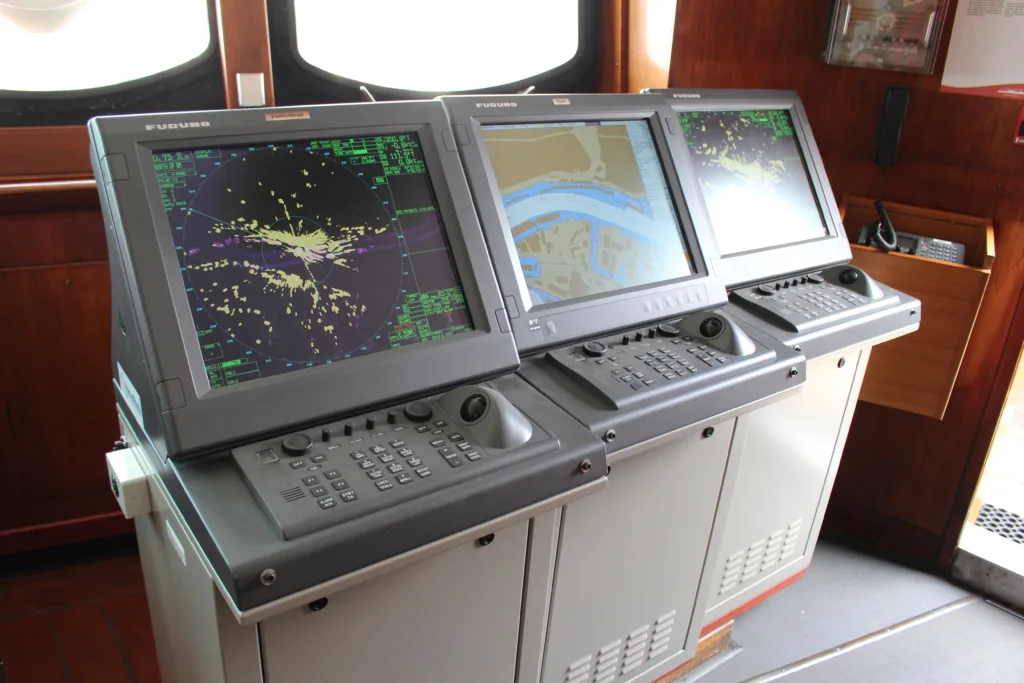
Typical ECDIS tests may include:
- passage planning,
- chart analysis,
- display configuration,
- and task execution under real-world ECDIS in navigation conditions.
Additional topics may cover alarm definitions, ENC updating, AIS and radar integration. Some assessments are done online, while others are conducted on full-mission bridge simulators.
⚙️ Types and Key Features of Popular ECDIS Systems
Each ECDIS system has its own way of presenting navigational data, menu structure, alert logic, and control interface. For a mariner, it’s not enough to understand the general ECDIS meaning—they must be confident in operating the exact system installed onboard their vessel. Below is an overview of the most commonly encountered models during testing.
Furuno ECDIS (F-Class Systems)
The Japanese-manufactured Furuno F-class systems, including the widely used Furuno FMD 3100, feature a unique quick-access panel and clean interface. The core of the interface is the InstantAccess Bar™, allowing the navigator to swiftly reach essential functions—from ECDIS chart layers to alarm management.
To successfully pass an ECDIS Furuno test, a mariner must:
- Configure safety depth and safety contour settings,
- Manually input and validate a voyage plan,
- Respond to system alarms and acknowledge warnings,
- Use measurement and object-filtering tools on the display.
Key advantages of Furuno FMD 3100 include fast chart rendering, clear visual separation of elements, and a logical one-task-one-screen structure.
JRC ECDIS (J-Class Systems)
Modern JRC ECDIS units (e.g., JAN-7201 series) operate on the jGUI interface, based on icons and context menus. These systems are particularly intuitive for vessel tracking and AIS interaction—hovering over a target immediately brings up full contact information.
ECDIS JRC test components typically include:
- Route creation using the built-in planner,
- Alarm handling (visualized both on-screen and via the control trackball),
- Chart and sensor management,
- Rapid recognition of icons and menu layout within jGUI.
Although JRC is user-friendly, it differs from other systems, and familiarity with its structure is essential for passing the test.
NS-4000 Platform (Transas / Wärtsilä ECDIS)
Widely deployed in the merchant fleet, the Transas 4000 (also known as Wärtsilä) features a dual-application model: Navi-Planner is used for route planning, while real-time monitoring occurs in a separate window. The interface resembles Windows, with toolbars, tabs, and contextual menus.
Common ECDIS Transas test tasks include:
- Route planning with depth limits, restricted areas, and ETA calculations,
- Route Check execution to verify safety,
- Integration with navigation sensors and signal redundancy setup,
- Alarm recognition and response procedures.
Unlike Furuno or JRC, Transas encourages “windowed” thinking, requiring quick task-switching and understanding of its modular workflow.
Kongsberg ECDIS (K-Series)
The Kongsberg ECDIS system is part of a fully integrated bridge solution, tightly linked with autopilot, radar, and other navigation sensors. The interface is minimalistic, yet functionally organized according to operational tasks.
Test topics generally include:
- Setting ship-specific safety parameters,
- Route planning and route validation,
- Alarm management, including classification by level and type,
- Layer control and sensor source selection.
Kongsberg emphasizes reliability and procedural discipline. Success in using this system depends more on understanding its logic structure than simply navigating button locations.
Simrad ECDIS (E-Series and MARIS)
Simrad ECDIS systems, including the MARIS ECDIS900, are often found on ferries, auxiliary vessels, and selected merchant ships. The E5024 model offers a modern look reminiscent of consumer-grade chartplotters but includes full ECDIS functionality.
Key points for ECDIS Simrad include:
- Route creation and modification,
- Rapid access to navigational object data (e.g., buoys, lighthouses),
- ENC chart loading and management,
- Customizing ECDIS chart display and AIS information settings.
MARIS offers a more technical interface, requiring the officer to fully understand menu structures and navigational functions.
✅ How the ECDIS Test Is Conducted
For most seafarers, the ECDIS test is far more than a formality. It is a hands-on assessment of whether the officer can confidently and safely operate an Electronic Chart Display and Information System under conditions that closely simulate actual watchkeeping.
ECDIS assessments may take place in:
- certified maritime training centers,
- crewing agency offices with a simulator setup,
- or online platforms featuring specific ship ECDIS models.
Typically, the mariner is presented with a virtual bridge environment where an ECDIS chart is displayed. The task is to complete a sequence of navigational operations using the interface of a specific system—Furuno, JRC, Transas, Kongsberg, Simrad, etc.
✅ What the ECDIS Test Evaluates
The test covers both navigation skills and familiarity with system-specific interfaces, as well as response to abnormal or emergency conditions. Standard tasks often include:
Route Planning:
Create a voyage plan from Point A to Point B, taking into account safety contours, no-go zones, TSS (Traffic Separation Schemes), and charted hazards.
Safety Parameters & Alarm Configuration:
Set vessel draft, depth contours, and alarm zones. Trigger and verify ECDIS alarm responses when approaching a hazard.
Voyage Monitoring:
Track vessel position in real-time, monitor cross-track errors, and control ETA adjustments.
ECDIS Chart Interaction:
Identify symbols and charted features, manage ECDIS display layers, measure range and bearing, and demonstrate understanding of chart symbology. Misinterpretation of ECDIS icons is a common point of failure.
Alarm Response:
Demonstrate proper action when encountering GPS signal loss, collision risk with other vessels, or chart system errors. The officer must diagnose the issue and take appropriate corrective steps.
✅ ECDIS Test Focus: Model-Specific Skills
A key part of the test is the specific ECDIS model being used. This may be:
- Furuno FMD 3100 – streamlined interface with quick-access panels and minimal submenus.
- JRC JAN-7201 – icon-based navigation, pop-up windows, and integrated route editing.
- Transas Navi-Sailor 4000 – includes Navi-Planner module and multi-layered settings.
- Kongsberg ECDIS (K-Bridge) – emphasizes structured task separation and sensor integration.
- Simrad E5024 or MARIS ECDIS900 – consumer-like interface with advanced display customization.
Each system follows a different operational logic, and passing the test is less about theory and more about real-time proficiency. The assessment validates how well a mariner navigates the unique layout, alert behavior, and input methods of the specific ECDIS in navigation.
⏱ ECDIS Training Duration and Differences Between Manufacturer-Specific Courses
To pass an ECDIS test and be cleared to operate a specific model onboard, a seafarer needs more than the generic IMO Model Course 1.27 certificate. It is essential to understand the interface and functionality of a particular system. This is where type-specific ECDIS training comes into play—it focuses on how a specific Electronic Chart Display and Information System is structured and operated.
📅 How Long Does Training Take?
Most type-specific ECDIS courses last approximately 16 hours, usually spread over two working days. In some cases, online training options are available in self-paced formats lasting 3–5 days, but they cover the same material.
Average course durations by ECDIS system:
| ECDIS System | Approximate Duration |
|---|---|
| Furuno FMD 3100 | 16 hours (2 days) |
| JRC JAN-7201/9201 | 16 hours (2 days) |
| Transas NS-4000 | 2–3 days |
| Kongsberg K-Bridge / K-Nav | 2 days |
| Simrad / MARIS | 2 days |
🛠 What Makes These Courses Different?
1. Interface Structure
Each brand designs its ECDIS system differently:
- ECDIS Furuno (FMD 3100) emphasizes speed—critical functions are always visible on screen via a quick-access bar.
- JRC ECDIS features a graphical, icon-based interface, but with navigation logic distinct from Windows-style systems.
- Transas 4000 (Navi Sailor) has a modular layout, separating route planning and monitoring into different windows.
- Kongsberg ECDIS is minimalist but offers deep sensor integration and alarm control.
- Simrad resembles an advanced chartplotter but with professional-level route logic and AIS features.
2. Simulator-Based Scenarios
Some courses emphasize realistic bridge scenarios, such as:
- Route planning through restricted or danger zones,
- Loss of GPS and fallback to backup positioning sources,
- Collision risk due to CPA/TCPA overlap and reacting to changing weather data.
3. Alarm Management Training
Every ECDIS system handles alarms differently:
- Furuno and Kongsberg present alarms on a dedicated logic panel,
- JRC may display alerts via a trackball control interface,
- Transas uses pop-up windows with categorized warnings that must be interpreted and acknowledged properly.
4. Voyage Planning and Route Safety Checks
All type-specific courses train officers to:
- Enter waypoints and geographical coordinates,
- Perform route checks against depth, danger zones, and TSS,
- Manage vessel draft, safety contour lines, and entry/exit points.
However, the methodology varies significantly between systems, justifying the need for model-specific training.
📘 What a Seafarer Should Learn Before Taking an ECDIS Test
Even if a mariner holds the general IMO Model Course 1.27 certificate, passing a type-specific ECDIS test can be challenging without hands-on knowledge of the actual system. The assessment does not rely on memorized theory—it measures your ability to operate an ECDIS electronic chart display and information system under conditions that replicate real-life bridge watch scenarios.
🧭 Core Knowledge Every Officer Should Have
🔹 ECDIS Chart Symbols and Legend
Misunderstanding chart symbols is one of the most common reasons for failing the test. The officer must correctly interpret:
- Depth soundings and contours,
- Buoys and leading lights,
- Prohibited areas and restricted zones,
- Hazard outlines and navigation warnings.
🔹 Passage Planning Skills
A seafarer must confidently:
- Enter waypoints and adjust legs,
- Use measuring tools (range and bearing),
- Set safety depths and contours,
- Conduct a route check for dangers.
The test often includes evaluating compliance with SOLAS voyage planning standards and the ability to adapt routes to situational hazards.
🔹 Alarm Management (ECDIS Alarms)
Candidates must demonstrate:
- How to respond to off-track alerts,
- What actions to take after gyro failure,
- How to handle shallow water proximity warnings,
- How to acknowledge and resolve ECDIS alerts properly.
🔹 Sensor and Signal Source Handling
Simulated failures (e.g., GPS or speed log) may occur during testing. The officer should be able to:
- Identify which sensor has failed,
- Switch to a backup source,
- Confirm that the displayed data remains accurate.
🔹 ECDIS Display and Layer Management
Officers must know how to:
- Enable or disable AIS, depth layers, and chart labels,
- Switch between North-Up and Head-Up display modes,
- Operate in night navigation mode.
These tasks vary significantly between systems, such as Furuno FMD 3100, Transas 4000, or Simrad, and unfamiliarity may lead to confusion without proper practice.
✅ Effective Test Preparation Tips
Use Simulators or Demo Versions
Some manufacturers, like Transas and Furuno, offer demo software or emulators. This is an excellent way to explore the interface before taking the test.
Study Official Manuals and User Guides
If you know which system the test will be based on, review the official manual. Learn how the menus are structured, what key functions are called, and how to navigate the interface.
Take Online Courses and Interactive Training Modules
Several platforms—including Learnmarine, Safebridge, and OceanTG—provide interactive training for specific ship ECDIS models. These mirror classroom-based courses and often include practical exercises.
Train Your ECDIS Thinking
ECDIS testing is not just about clicking the right buttons. It assesses your ability to analyze dynamic situations, react promptly, and apply critical thinking under pressure—just like on the bridge during a real watch.
🎯 How We Help You Pass the ECDIS Test — With Guaranteed Results
If you’re preparing to take a test on any of the major ECDIS systems—Furuno, JRC, Transas, Kongsberg, or Simrad—we know exactly how to get you ready to pass on the first try.
We don’t offer vague advice—we train you on exactly what gets tested, in a clear, focused, and efficient way.
🔹 We’ll guide you step-by-step through how your specific system works: what to press, where to find key functions, and how to think within the logic of the interface.
🔹 We’ll walk through real-world simulator tasks and interview-style challenges: route planning, alarm handling, sensor switching, ENC management.
🔹 We’ll provide learning materials that actually help: condensed manuals, flowcharts, cheat sheets, and even screencast walkthroughs.
🔹 We’ll highlight what matters—so you don’t waste time on irrelevant theory.
🔹 Most importantly, we’ll help you practice exactly what’s going to be assessed.
📌 The result? You show up to the test confident, prepared, and in control. No surprises.
If you’re about to take an ECDIS test and want to ensure success—reach out to us. We’ll train you. And you’ll pass.